June 07, 2026
A rundown of the new Kahu client dashboard — urgent ticket limits, real priority controls, and a panel that shows which tickets are waiting on you.

Thomas · Technical Partner
Full profile →If you logged into the Kahu portal this week, you probably blinked twice. The dashboard looks completely different. No need to panic, this was an additive fix.
Are we incredibly late to the standard on this? Oh, absolutely. Manual priority shifting and queue limits are basic ticketing features. Most tech companies launch with this stuff on day one. But frankly, we’ve been ignoring our own portal for a long time.
I’m a self-confessed workaholic, and I grew up around waterparks. To me, engineering is supposed to be fun. If I’m going to spend 14 hours a day staring at code, I want to spend it in the engine room doing the heavy lifting that actually keeps your business moving. For the past couple of years, our engineering hours have gone entirely into your projects: tuning internal SCM runners to slash your build times, hardening base container images, and refactoring core repositories so your infrastructure never skips a beat.
We chose to spend our fun hours on your backend plumbing rather than polishing our own front door. But as our client base grew, our administrative debt caught up with us. The old portal became a bottleneck. This week, we finally took a wrench to it.
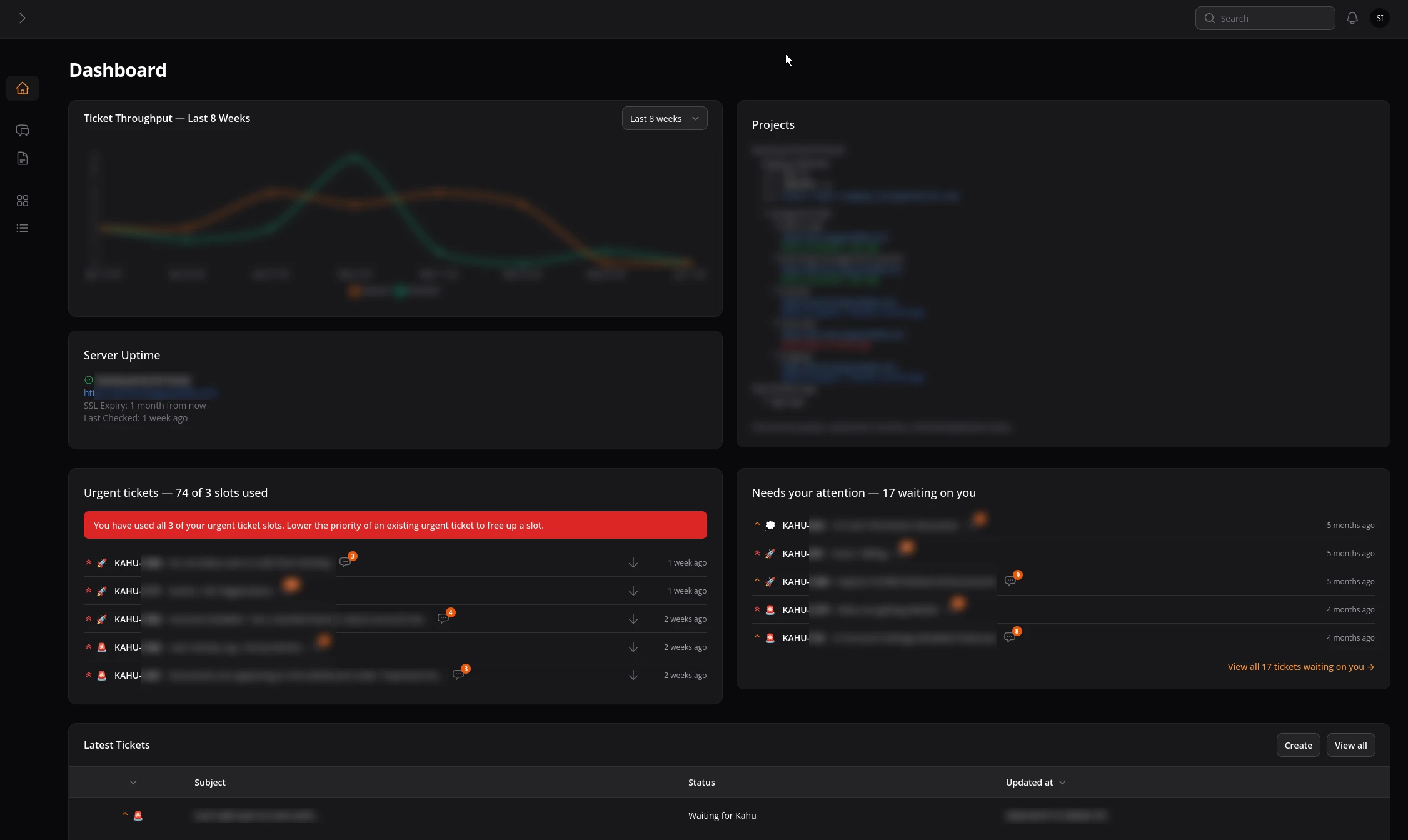
In software support, there is a classic trap: Urgency Inflation. For a long time, our support system defaulted every single incoming ticket to "Urgent."
I look at ticket queues the same way I look at waterpark slides. If you let every single person drop down the slide at the exact same millisecond, everyone crashes at the bottom, and the lifeguards can't tell who is actually drowning. When a critical production outage shares the exact same "Urgent" flag as a minor CSS typo fix, the word loses all meaning. Our engineers had to waste time manually parsing the queue, and you had no real way of telling us what actually mattered most to your business that morning.
So, we rebuilt how water flows through the pipes.
To make "Urgent" actually mean drop what you are doing, each client can now have a maximum of three open Urgent tickets at a time.
This is configurable per-client of course, but this helps enforce the true meaning of "Urgent".
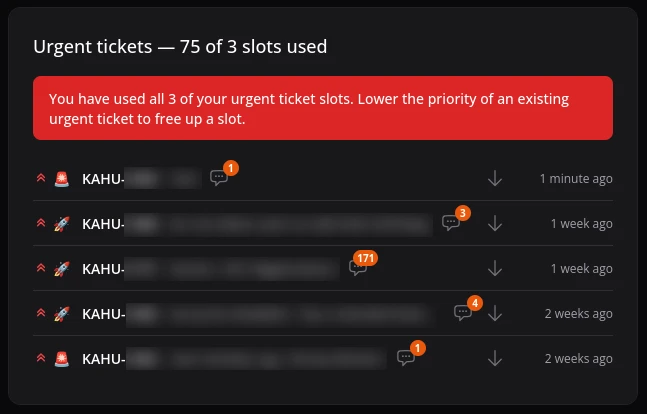
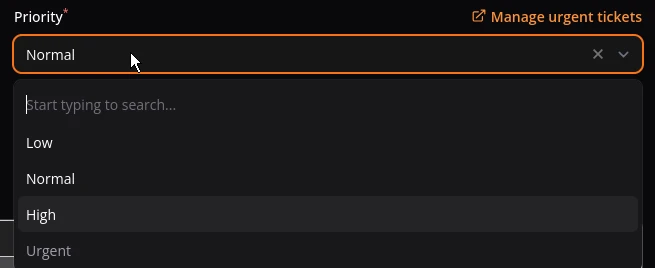
If you hit that three-ticket cap, the portal will temporarily lock out the Urgent option for new submissions. The dashboard will show you exactly which three tickets are holding those slots. If a fourth issue pops up that’s a massive emergency, you can just bump an older one down to make room. We can adjust this number on a per-client basis—so if your specific operations need a bigger buffer, just talk to us.
New tickets now default to Normal. From there, you get to choose: Low, Normal, High, or Urgent.
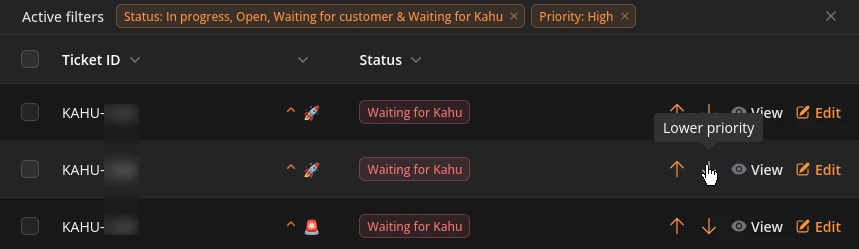
If your priorities shift mid-day—which happens constantly when you're launching new features—you don't need to open the ticket or leave a comment asking us to change it. We added little up and down arrows right on the main ticket list view. You can shuffle your own queue on the fly like a playlist.
We also realized that bottlenecks cut both ways. A lot of times, a ticket stalls out because our engineers are sitting around waiting for a client to drop an API key, clarify a feature requirement, or approve a deployment to a staging environment.
To fix this, we built the "Needs your attention" panel.
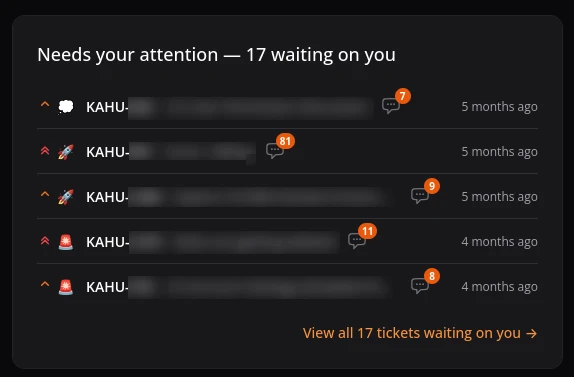
This section isolates the exact tickets where we’ve replied and are waiting on your green light, sorted from oldest to newest. If a project feels like it's losing momentum, check this panel first. Usually, a quick one-line reply is all it takes to clear the logjam and get the water moving again.
While we were under the hood, we cleaned up a few other things that were driving us crazy:
Honest Activity Counters: Timestamps and activity notifications now only reflect updates you can actually see. Our internal engineering notes and background system updates no longer trigger false alarms on your end.
Hover Metadata: Hover your mouse over any ticket's "last updated" time to see a quick micro-log of exactly what happened and when.
The Burn-Down Dashboard: We added real-time charts tracking your ticket throughput, developer hours, and wallet burn-down so you can see exactly where your resources are going.
Bigger Click Targets: We widened the click rows. Precision-clicking a tiny 20pixel row on a laptop trackpad while sitting at a coffee shop was a terrible game, and we got tired of playing it.
We didn't just do this to make the portal look pretty. This massive structural reorganization was the necessary groundwork for something much bigger: formal Service Level Agreements (SLAs).
You can't promise contract-backed, guaranteed response times if your data is noisy. Under our old system, tracking true metrics was mathematically impossible because a minor question and a full-scale server meltdown wore the exact same badge.
By separating the signal from the noise—capping emergencies and accurately tracking client-side versus engineer-side latency—we are finally building a clean, reliable data baseline. We are already using this new system to map out formal response-time commitments for true Urgent tickets. The infrastructure is live, the tracking is running, and we will be rolling out those binding SLA frameworks in an upcoming update very soon.
Have questions or want to poke around the new layout? Log into the portal and open a ticket. Normal priority is perfectly fine.
COMING SOON
No spam. Only significant launches of our clients! Exciting stuff.

We’re here to help
Schedule a 1-2-1 meeting with 2 clicks! Let's have a quick chat to see if Kahu Software is right for you.
